
Stay Informed Without Attending Every Meeting
How executives use the Optiverse AI assistant to get instant briefings on any meeting, generate cross-team visibility reports, track strategic decisions over time, and prepare board updates from real conversation data.
You don't have time for every meeting. But you need to know what happened, what was decided, and what's at risk. Optiverse gives you instant access to the substance of any conversation across your organization.
Get Briefed on Any Meeting in Seconds
You don't need to attend every meeting. You need the outcomes.
Open any recording in Optiverse and ask OptiAgent directly:
- "What are the 3 most important things from this meeting?"
- "What decisions were made and who owns what?"
- "Were there any disagreements or unresolved issues?"
The response includes clickable source references linked to exact timestamps in the recording. If something matters, you can verify it in the speaker's own words within seconds.
This works for meetings you attended, meetings you skipped, and meetings you didn't know happened. If it was recorded, you can query it.
Cross-Team Visibility Without Extra Meetings
Use Multi-Meeting Search on the Optiverse homepage to ask questions that span departments, teams, and time periods.
Examples:
- "What are the top issues engineering raised this week?"
- "Summarize all client-facing meetings from this week with open risks"
- "What did the product team commit to delivering this sprint?"
- "Are there any cross-team dependencies that were flagged in the last 7 days?"
You get a consolidated answer with sources from multiple meetings. No need to schedule a sync just to gather information that already exists in conversations.
Track Strategic Decisions Over Quarters
Decisions get made, revised, and sometimes forgotten. The assistant tracks the full arc across months of meetings.
Examples:
- "What strategic decisions have we made about [initiative] over the last 6 months?"
- "How has our position on [topic] changed since Q1?"
- "When did we first discuss [initiative], and what was the original rationale?"
- "List every commitment made to the board in the last two quarters"
This is especially useful for:
- Board preparation. Verify that what you plan to report matches what was actually decided.
- Alignment checks. Confirm that teams are still executing on the direction that was agreed.
- Institutional memory. Retrieve the reasoning behind past decisions, not just the outcomes.
Generate Board and Investor Reports
Pull together narratives from internal meetings into structured, polished documents. The assistant synthesizes across many conversations and outputs formatted reports.
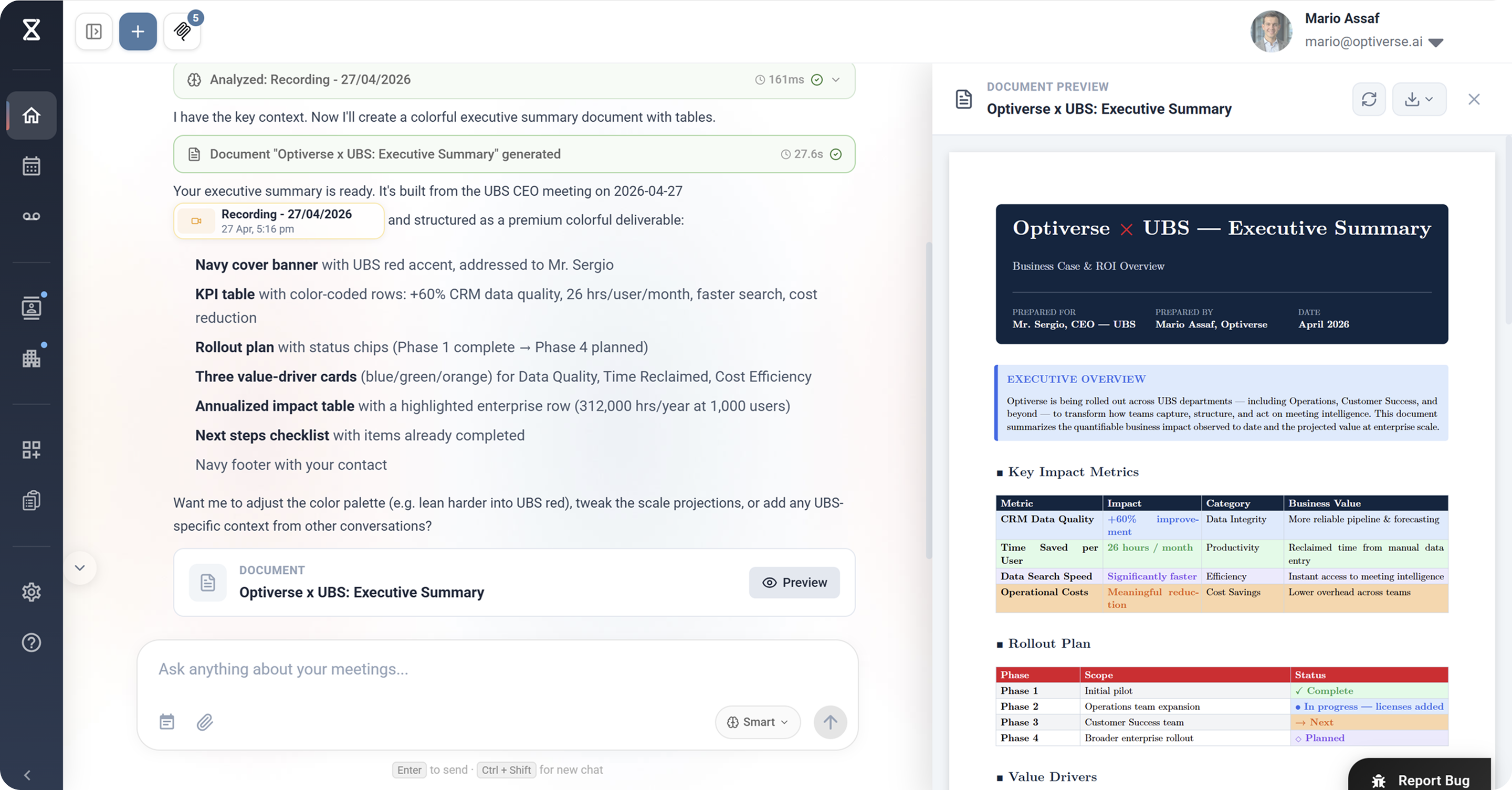
Examples:
- "Generate an executive summary of all leadership meetings this month, focusing on revenue, product milestones, and risks"
- "Create a board update covering Q2 progress against our strategic pillars"
- "Draft an investor memo summarizing product traction and customer feedback from the last 90 days"
Outputs are available as PDF or Word documents, ready for distribution. The content is grounded in what was actually discussed, not what someone remembered to write down.
Pipeline and Revenue Intelligence
When connected to your CRM via integrations, the assistant combines what sales discussed in meetings with actual pipeline data from Salesforce or HubSpot.
Examples:
- "What's the current state of deals over $100K? What did the team say about them in the last two weeks?"
- "Which enterprise deals are at risk based on recent call sentiment?"
- "Summarize the pipeline review meeting and flag any deals where the CRM stage doesn't match what was discussed"
You see the full picture: what's recorded in the CRM and what was actually said in conversations. Discrepancies become visible immediately.
CRM integration requires connecting Salesforce or HubSpot via MCP. See MCP Connections for setup.
Example Prompts for Executives
| What you need | What to ask the assistant |
|---|---|
| Quick meeting briefing | "Give me the 3 key takeaways from today's leadership sync" |
| Team oversight | "What did the engineering team discuss this week? Any blockers?" |
| Strategic tracking | "How has our go-to-market strategy evolved over the last quarter?" |
| Board preparation | "Compile all strategic decisions from leadership meetings this quarter into a board summary" |
| Pipeline intelligence | "Which deals over $50K were discussed this week and what's their current status?" |
| Decision history | "When did we decide to deprioritize [initiative], and what was the reasoning?" |
| Risk identification | "Are there any customer escalations or churn risks mentioned in meetings this month?" |
| Cross-team alignment | "What did product and sales each say about the Q3 roadmap? Are there conflicts?" |
| Investor prep | "Draft a 1-page investor update based on this month's all-hands and leadership meetings" |
| Accountability check | "List all action items assigned to VPs in the last 30 days and their current status" |
Get Started
Setup takes under 5 minutes. Once your calendar is connected, the assistant joins meetings automatically. You don't need to change how your organization runs meetings. Just let the recording happen, and everything becomes searchable.
- Create your account (Google or Microsoft sign-in)
- Connect your calendar
- After any meeting is recorded, open it and ask the assistant your question
You can also ask your team to share their recordings with you, giving you visibility into meetings you never attended.
Want to see how Optiverse gives executive teams visibility? Book a short call and we'll show you live.
How Product Managers Aggregate Feedback and Track Decisions with the Optiverse Assistant
How product managers use the Optiverse AI assistant to aggregate feature requests from dozens of meetings, track how product decisions evolved, align stakeholders, and generate requirement documents from real discussions.
Automatic Action Items and Progress Reports from Project Meetings | Optiverse
How project managers use the Optiverse AI assistant to extract action items automatically, generate progress reports from meeting discussions, identify recurring blockers, and keep stakeholders aligned without extra status meetings.