
Deep Analysis Protocols
Multi agent processing for detailed, formatted analysis with tables, extended text, and granular data extraction.
Deep Analysis protocols use a multi agent approach under the hood to produce detailed, structured summaries that go far beyond surface level extraction. They take longer to process (typically 1–2 minutes) but deliver significantly richer output.
To enable Deep Analysis on any protocol, toggle the Deep Protocol switch in the Protocol Template Editor.

When to Use Deep Analysis
Deep Analysis protocols are designed for situations where:
- You need tables as part of the output (e.g., topics with owners, deadlines, and status columns)
- The analysis requires multiple reasoning passes over the data
- You want extensive, multi paragraph text with detailed findings per section
- Your instructions per section are complex and nuanced, requiring the AI to follow intricate logic
- You need formatted output that goes beyond simple text and lists
Ideal Meeting Types
- Complex client meetings with many topics, stakeholders, and follow ups
- Strategy sessions requiring analysis of discussed options with pros and cons
- Detailed interview scorecards with multiple evaluation criteria
- Management reviews with department level breakdowns
- Project retrospectives with categorized findings
- Any meeting where depth and structure matter more than speed
How Deep Analysis Works
Unlike Simple protocols that use a single model pass, Deep Analysis protocols use a multi agent architecture. Multiple AI models work together:
- One agent analyzes the transcript structure and context
- Another agent processes each section with deeper reasoning
- The results are synthesized into a coherent, formatted output
This multi step approach allows for more nuanced extraction, cross referencing between different parts of the conversation, and richer formatting in the output.
Additional Output Capabilities
Deep Analysis protocols support everything Simple protocols offer (text, lists, numbers, predefined options) plus:
Tables
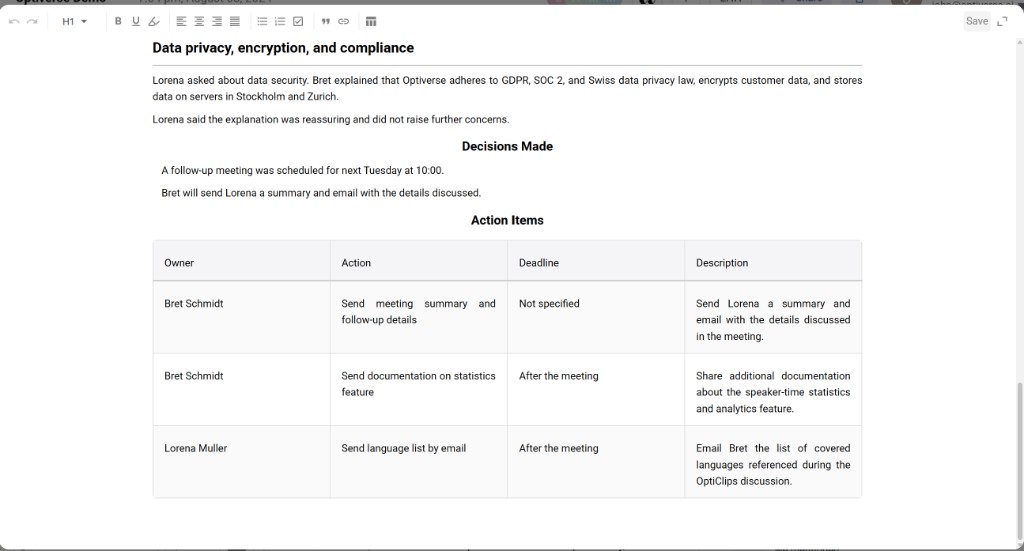
Structured tabular output with multiple columns. Define the columns you want and the AI populates rows based on the meeting content.
Use cases:
- Topics discussed with owner, status, and deadline per row
- Evaluation criteria with scores and justifications
- Comparison of options discussed with pros and cons
- Participant contributions with topic and action item columns
Formatted Extended Text
Longer, more detailed text output with internal structure (headers, emphasis, structured reasoning). Unlike Simple protocol text which tends to be concise paragraphs, Deep Analysis text can include layered analysis.
Use cases:
- Detailed executive summaries with multiple sub topics
- Analysis sections that weigh different viewpoints discussed
- Comprehensive meeting narratives with context
Built in Text Editor
Deep Analysis protocols come with a full text editor directly on the recording page. Once the protocol finishes processing, you can edit the output, adjust formatting, correct any details, or restructure content before exporting. This gives you full control over the final document that gets shared or downloaded.
Writing Instructions for Deep Analysis
Because Deep Analysis can handle more complex reasoning, your per section instructions can be significantly more detailed than in Simple protocols.
Simple Protocol Instruction (concise):
List the action items discussed in the meeting with owners.
Deep Analysis Instruction (extensive):
Analyze the full conversation and extract every commitment, task, or follow up action mentioned, whether explicitly stated as an action item or implied through agreement. For each item, determine: (1) the specific task, (2) who is responsible based on context, (3) any deadline mentioned or implied, (4) the priority level based on how much discussion time it received and the tone of urgency. If responsibility is ambiguous, note it as "TBD" and include the context that makes it unclear. Exclude items that were discussed but explicitly rejected or deferred indefinitely.
Deep Analysis can follow this level of nuance because its multi agent architecture allows for more reasoning depth per section.
Who Should Use Deep Analysis
Deep Analysis is recommended for experienced prompt engineers. People who are comfortable writing detailed, specific instructions and iterating on prompt quality. The richer the instructions, the better the output.
For Beginners
If you're new to prompt engineering or protocol creation, we recommend:
- Start with the AI assistant. Describe what you need and let it generate the protocol structure.
- Use Simple protocols first. Get familiar with how sections, instructions, and output types work.
- Graduate to Deep Analysis once you're comfortable refining prompts and understand what level of detail produces the best results.
- Upload a Document Template. If you already have a meeting template, minutes format, or any reference document, you can upload it and the Optiverse team will help you build your protocol inside the software.
- Contact our team at support@optiverse.ai. We can help you build optimized Deep Analysis templates for your specific use case.
For Experienced Users
If you're comfortable with prompt engineering:
- Write detailed, multi sentence instructions per section
- Specify edge cases and how to handle ambiguity
- Define the reasoning logic you want the AI to follow
- Use the global description to set overarching analytical standards
- Iterate by testing on diverse meetings and refining based on results
Processing Time and Credits
| Aspect | Simple Protocol | Deep Analysis |
|---|---|---|
| Processing time | Seconds | 1–2 minutes |
| AI credit usage | Standard | Higher (multi agent processing) |
| Iteration speed | Fast, regenerate instantly | Slower, wait 1–2 min per iteration |
Iteration tip: Build and refine your protocol structure using Simple mode first. Once you're satisfied with the sections and their basic output, switch to Deep Analysis for the final version. This avoids burning time and credits during the experimentation phase.
Deep Analysis + Integrations
Deep Analysis protocols work with integrations just like Simple protocols. The structured output feeds into your connected systems. However, keep in mind:
- Tables are best suited for display on the recording page and PDF/Word export. Some CRM integrations may flatten table data.
- Extended text works well for rich notes fields in CRM systems but may need to be truncated for short text fields.
- For integration critical fields (dropdowns, numbers), the data type behavior is identical to Simple protocols.
Example: Client Meeting Deep Analysis Protocol
| Section | Output Type | Instruction Summary |
|---|---|---|
| Executive Summary | Extended Text | Comprehensive overview of the meeting with context, outcomes, and tone |
| Topics & Decisions | Table | Columns: Topic, Discussion Summary, Decision Made, Owner, Deadline |
| Risk Factors | List | Identify risks, concerns, or red flags raised, explicitly or implicitly |
| Relationship Health | Options | Classify: Strong / Stable / At Risk / Critical |
| Detailed Next Steps | Table | Columns: Action, Responsible Party, Deadline, Priority, Dependencies |
| Open Questions | List | Unresolved questions that need follow up before next meeting |