Multi-Client Meeting Management and Proposal Generation for Consultants | Optiverse
How consultants and agencies use the Optiverse AI assistant to maintain full context across multiple clients, generate proposals from discovery calls, track commitments per engagement, and prepare for client meetings instantly when juggling many accounts.
Consultants juggle context. Back-to-back calls with completely different clients, each expecting you to remember exactly where you left off. The Optiverse assistant eliminates ramp-up time by giving you instant access to every conversation with every client, and the ability to generate proposals, track deliverables, and draft communications from what was actually discussed.
Instant Context Switching Between Clients
The hardest part of consulting is maintaining depth across many engagements. You finish a call with one client and immediately join a call with another. The Optiverse assistant makes that transition seamless.
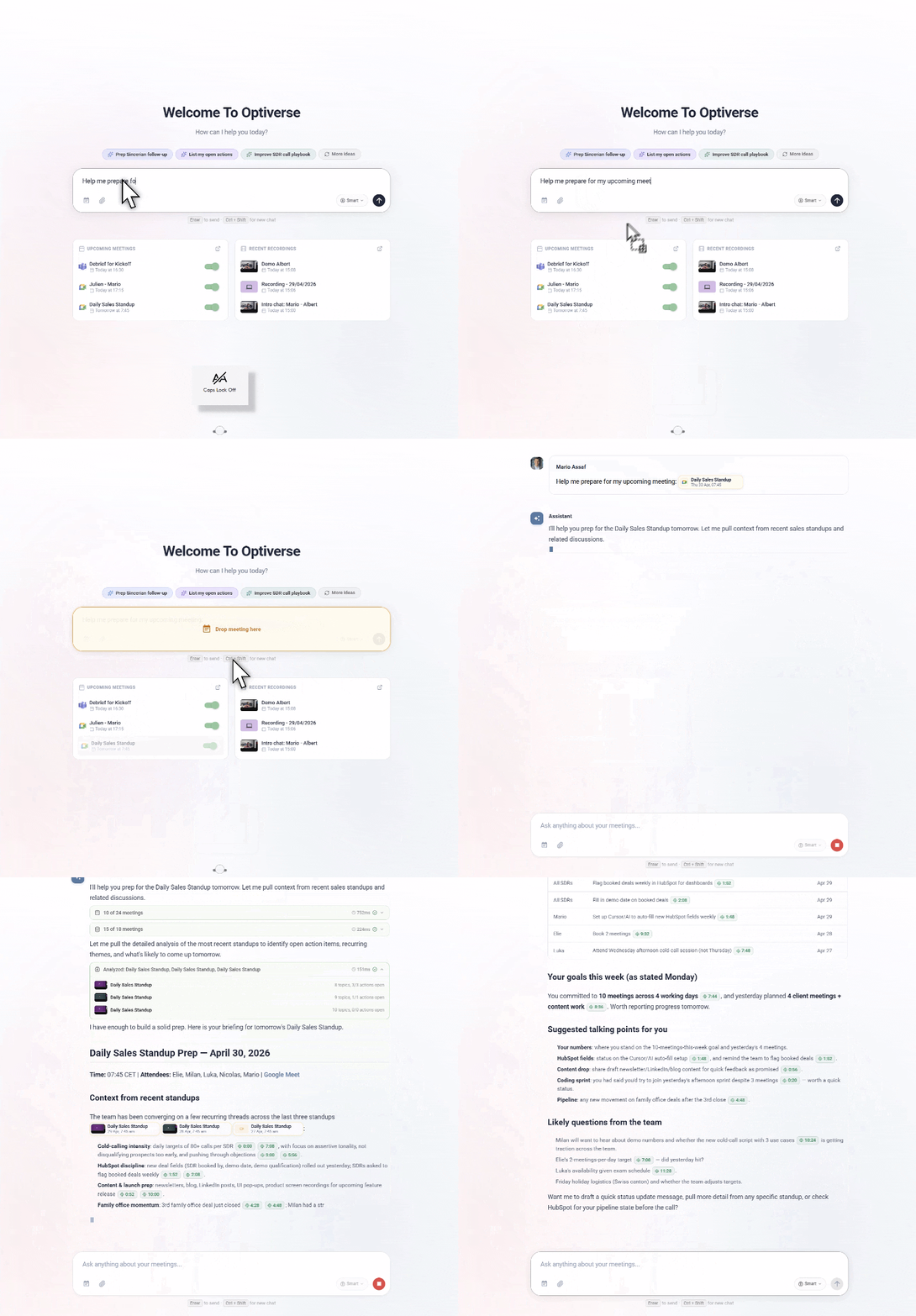
Before any client call, ask:
- "Summarize my last 3 meetings with Meridian and list open action items"
- "What did we commit to delivering for Atlas Corp at the end of our last session?"
- "What was the main discussion point with NovaTech last time and where did we leave it?"
Or drag and drop:
Drag the upcoming calendar event into the Optiverse search on the homepage. The AI pulls all previous meetings with that client, open items, and key context automatically.
What you get in seconds:
- Summary of recent interactions
- Outstanding deliverables and commitments
- Key contacts and their priorities
- Topics that need follow-up
- Any unresolved questions from previous sessions
You walk into every call fully briefed, even if you haven't spoken to that client in three weeks. No more scrambling through notes or starting meetings with "remind me where we left off."
Generate Proposals and SOWs from Discovery Calls
Discovery calls are where scope is defined. But translating a fluid conversation into a structured proposal takes hours. The assistant does the heavy lifting by extracting stated needs, timelines, and constraints directly from the recording.
What to ask:
- "Generate a scope of work based on today's discovery call with Prism, including their stated needs, timeline, and budget constraints"
- "Draft a proposal outline based on what the client described as their top three priorities"
- "Create a project plan from the kickoff meeting, including milestones and responsibilities discussed"
- "What requirements did the client explicitly state versus what I inferred? List them separately"
What makes this better than writing from scratch:
- The proposal references what the client actually said, using their language
- Nothing mentioned in the conversation gets missed or forgotten
- You can cite specific statements when justifying scope or pricing
- The draft is ready in minutes, not hours
Practical workflow:
- Conduct the discovery call with Optiverse recording
- Immediately after, ask the assistant to draft a proposal outline
- Review and refine the structure (add your methodology, pricing, terms)
- Send a proposal the same day while the conversation is still fresh in the client's mind
Speed matters. The consultant who sends a tailored proposal within 24 hours wins over the one who takes a week.
Track Deliverables and Commitments per Client
When you manage five, ten, or twenty active engagements, things fall through the cracks. The assistant tracks what was promised, what's outstanding, and what's overdue across every client.
What to ask:
- "What have we committed to delivering for Vertex and what's still open?"
- "List all deadlines mentioned in meetings with CloudFirst this month"
- "Across all active clients, what deliverables are due in the next two weeks?"
- "What did I promise to send after my last meeting with Beacon Labs?"
Cross-engagement view:
- "Which clients have outstanding items I haven't followed up on?"
- "List everything I committed to this week across all client meetings"
- "What proposals or documents did I promise to send that I haven't sent yet?"
This is your safety net. Run it at the end of each day or week to ensure nothing slips. The assistant catches commitments made casually in conversation that you might not have written down.
Meeting Prep When Juggling Many Accounts
The drag-and-drop meeting prep works especially well for consultants. When you have five client calls in a day, you need instant context before each one.
How to build it into your routine:
- At the start of each day, look at your calendar
- For each client meeting, drag the event into the Optiverse search
- Scan the briefing for open items, recent progress, and upcoming milestones
- Identify one or two things to proactively bring up that show attentiveness
What this signals to clients:
When you reference something specific from three meetings ago, the client notices. It demonstrates that you're engaged, organized, and invested in their success. That perception translates directly into renewals, expansions, and referrals.
Prompt variations for different meeting types:
| Meeting type | What to ask |
|---|---|
| Strategy session | "What strategic decisions have we discussed with this client over the last quarter?" |
| Progress check-in | "What was delivered since our last meeting and what's still pending?" |
| Kickoff meeting | "Summarize the proposal and SOW we agreed on. What are the client's stated expectations?" |
| Renewal discussion | "What value have we delivered this year? What outcomes has the client described?" |
Cross-Client Pattern Recognition
Working across multiple clients gives you a unique vantage point. The assistant helps you identify patterns that inform your practice and service offerings.
What to ask:
- "What challenges have multiple clients raised about their data migration process this quarter?"
- "Which recommendations have I made most frequently across all engagements this year?"
- "What outcomes are clients achieving and how do they describe the value we delivered?"
- "What questions do new clients always ask in the first month?"
How to use these patterns:
- Refine your frameworks. If you keep solving the same problem, build a methodology around it.
- Create productized services. Patterns across clients reveal demand for repeatable offerings.
- Improve proposals. Use outcomes from past clients to strengthen the case for new prospects.
- Develop content. Write thought leadership based on real patterns, not theoretical ones.
Example Prompts for Consultants and Agencies
| What you need | What to ask the assistant |
|---|---|
| Client context before a call | "Summarize my last 3 meetings with [client] and list all open action items" |
| Proposal generation | "Draft a scope of work from today's discovery call including stated needs, timeline, and budget" |
| Deliverable tracking | "What have we committed to delivering for [client] that's still outstanding?" |
| Cross-client overview | "What deliverables are due across all active clients in the next two weeks?" |
| Pattern recognition | "What problems have multiple clients raised about [topic] this quarter?" |
| Value documentation | "What outcomes has [client] described achieving through our engagement?" |
| Billing verification | "How many sessions have I had with [client] this month and what topics did we cover?" |
| Handoff preparation | "Generate a full briefing on the [client] engagement for a colleague taking over" |
| Referral preparation | "Summarize the results we delivered for [client] in language suitable for a case study" |
| End-of-engagement summary | "Compile everything we delivered, discussed, and recommended for [client] over the full engagement" |
Workflow Tips
- Start every day with a calendar scan. Drag each upcoming meeting into the search to prep in seconds.
- Run a weekly commitment audit. Ask "What did I commit to this week across all clients?" every Friday afternoon.
- Proposal same-day. After discovery calls, generate a proposal draft immediately. Speed wins deals.
- Document outcomes continuously. Periodically ask "What results has [client] described?" so you have case study material ready at engagement end.
- Use for timesheets. Ask "How many meetings did I have with [client] this month and what did we discuss?" for accurate billing and time tracking.
Get Started
Setup takes under 5 minutes. Sign up, connect your calendar, and the assistant joins your client calls automatically. From the very first recorded meeting, you can query it, draft from it, and search across it.
- Create your free account (Google or Microsoft sign-in)
- Connect your calendar and let the assistant join client meetings
- After your first discovery call, ask the assistant to draft a proposal outline
- Before your next client call, drag the calendar event into the search for instant prep
The compounding value is real. After one week of recorded client calls, you have a searchable multi-client knowledge base. After a month, you can run cross-client analyses and never lose context again.
Want to see how Optiverse works for consulting workflows? Book a short call and we'll demo it with your use case.
How HR Teams Aggregate Interview Feedback and Track 1:1s with the Optiverse Assistant
How HR and People Operations teams use the Optiverse AI assistant to compare interview feedback across panelists, track themes from 1:1 meetings over time, prepare for performance reviews with full context, and identify training needs from team discussions.
How Marketing Teams Mine Customer Voice and Competitive Intel with the Optiverse Assistant
How marketing teams use the Optiverse AI assistant to extract customer language from sales calls, gather competitive intelligence mentioned in meetings, track campaign feedback, and generate content grounded in real customer conversations.