
Zapier Integration
Connect Optiverse to 8,000+ apps through Zapier using a simple API key and webhook trigger.
Optiverse has a native Zapier integration that fires a trigger every time a meeting ends. This lets you route meeting data (summaries, transcripts, action items, attendees) into any of Zapier's 8,000+ connected apps without writing code.
How the Integration Works
Unlike generic webhook setups, Optiverse appears as a dedicated app inside Zapier's trigger picker. The connection is authenticated with an API key you generate in Optiverse. Once connected, Zapier receives a payload from Optiverse each time a meeting finishes processing, and you build whatever action steps you need on the Zapier side.
The flow is straightforward:
- A meeting ends and Optiverse processes the recording
- Optiverse fires the trigger event to Zapier with the meeting data
- Zapier runs your configured action steps (send email, update CRM, post to Slack, create task, etc.)
Because Optiverse sends structured data fields (title, date, attendees, summary, transcript), you can map each field directly to inputs in downstream Zapier actions. No parsing or formatting needed.
Setting Up the Connection
Step 1: Generate Your API Key in Optiverse
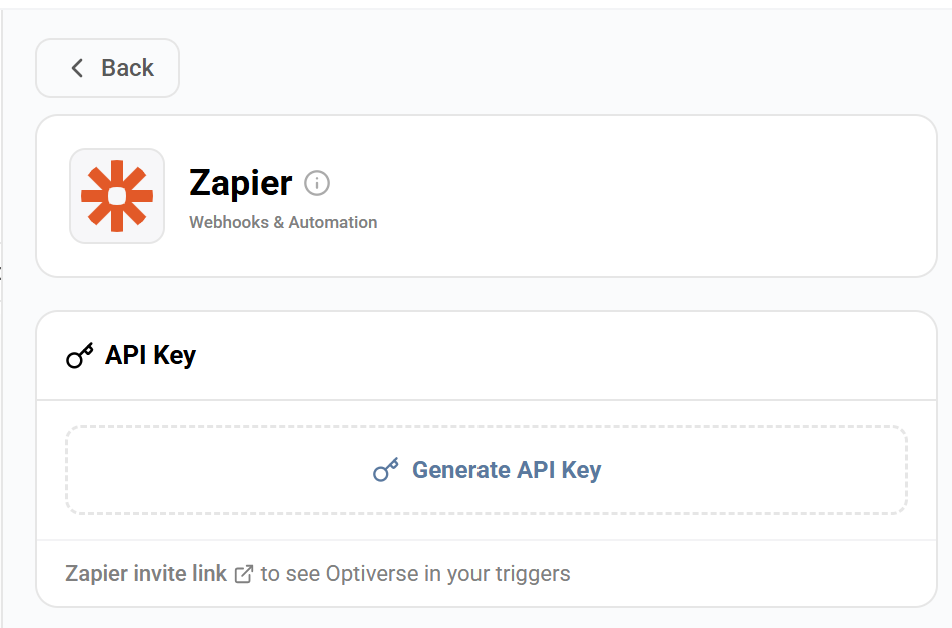
- Go to Settings > Integrations > Zapier
- Click Generate API Key
- Copy the key. You'll paste it into Zapier in the next step.
Treat the API key like a password. Anyone with it can receive your meeting data. If you suspect it's been compromised, generate a new one (which invalidates the old key).
Step 2: Connect Optiverse in Zapier
- Log in to Zapier and create a new Zap
- For the trigger, search for Optiverse in the app picker
- Select the trigger event (meeting ended)
- When prompted to connect your Optiverse account, paste the API key you generated
- Test the trigger. Zapier will pull in a sample meeting payload so you can see the available fields.
If Optiverse doesn't appear in the Zapier app picker, use the Zapier invite link shown on your Optiverse integration page to add Optiverse to your available triggers.
Step 3: Build Your Action Steps
Once the trigger test succeeds, add one or more action steps. You have access to all the fields Optiverse sends:
| Field | What It Contains |
|---|---|
| Meeting Title | The name of the meeting from your calendar |
| Date & Time | When the meeting took place |
| Attendees | List of participants |
| Organizer | Who scheduled the meeting |
| Summary | The AI-generated meeting summary (follows your active protocol) |
| Transcript | The full conversation transcript |
| Action Items | Tasks and follow-ups detected during the meeting |
Map these fields to inputs in your downstream actions. For example, map "Summary" to the body of a Gmail draft, or "Action Items" to a task description in Asana.
What You Can Automate
Here are practical workflows teams commonly build:
| Workflow | Trigger → Action |
|---|---|
| Auto-send summary to email | Meeting ends → Gmail sends summary to attendees |
| CRM deal update | Meeting ends → HubSpot/Salesforce updates deal notes |
| Slack digest | Meeting ends → Slack posts summary in a team channel |
| Task creation | Meeting ends → Asana/Jira creates tasks from action items |
| Spreadsheet logging | Meeting ends → Google Sheets adds a row with meeting metadata |
| Document generation | Meeting ends → Google Docs creates a formatted meeting report |
Combining with Protocols
The summary field Zapier receives follows whichever protocol is active for that meeting. This means you can control exactly what data reaches your automations by configuring the right protocol.
For example, if you use a sales discovery protocol (like MEDDIC), the summary field will contain structured fields like budget, timeline, decision criteria, and next steps. Your Zapier actions can then map those directly into CRM fields.
Zapier vs. n8n
Both platforms receive Optiverse meeting data and automate downstream actions. Choose based on your needs:
| Zapier | n8n | |
|---|---|---|
| Best for | Quick no-code automations | Complex multi-step logic, self-hosted |
| Setup | API key, works in minutes | Webhook URL, slightly more config |
| Pricing | Free tier (limited tasks), paid plans scale | Free self-hosted, paid cloud option |
| Custom logic | Paths and filters | Full code nodes, branching, loops |
| App ecosystem | 8,000+ apps | 400+ nodes plus HTTP/code for anything |
You can use both simultaneously. For example, use Zapier for simple "send summary to Slack" automations and n8n for complex workflows that require conditional logic or self-hosting.
Availability
The Zapier integration is available on the Pro plan and above. Check Pricing for details.